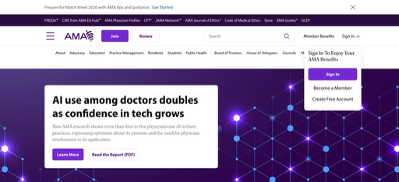
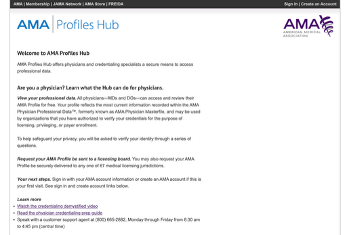
Medical students are eligible for complimentary access to Epocrates+, an important drug information resource that would otherwise require a paid subscription. To create your Epocrates+ account, enter your AMA ME number.
While the Epocrates+ app is deployed to your iPad , as a student, you are responsible for creating your own account.
There is also a free version of Epocrates, which comes with use limits. It may be sufficient for the start of Year 1 if you are delayed in getting access to the full version.
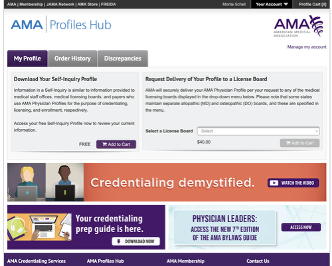
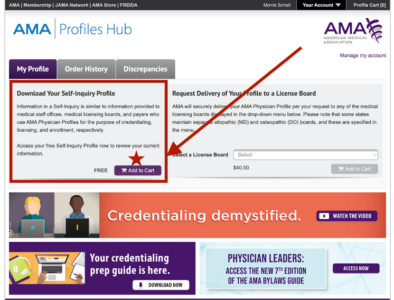
Once you sign in, it should look like this. Click Add to Cart under the Download Your Self-Inquiry Profile box.
Tap to enlarge.
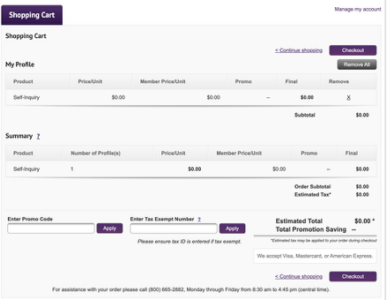
Now, go to your cart and finish checking out. It should be $0.00.
Tap to enlarge.
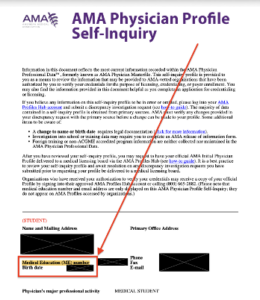
Once you have finished checking out, you will be able to download your AMA Physician Profile Self-Inquiry. Your Medical Education number will be at the bottom of the first page.
From here, put your Medical Education number into Epocrates to gain access to their plus version.
The LEAD unit is responsible for Epocrates implementation. For technical questions and assistance, please click the button for support.